http://www.youtube.com/watch?v=BvGzmrAFrIA

Saturday, 25 May 2013
Post for the Video Upload
http://www.youtube.com/watch?v=BvGzmrAFrIA

An Original Story?
I recently came across some interesting information about River Spirit folklore. I find that these variably reflect what I have developed, although there are some great differences. The ones that are relevant to my project are the Scandinavian folklores.
Here is the link to the page about them:
https://en.wikipedia.org/wiki/Neck_(water_spirit)
Here is the link to the page about them:
https://en.wikipedia.org/wiki/Neck_(water_spirit)
Wednesday, 22 May 2013
File Exporting Part 2
So it turns out that exporting via .swf files isn't such a good idea as the coloured layers kept getting shifted. So instead, I exported the Flash files to Quicktime, only I changed the settings slightly so that all the frames were collected. The only one I couldn't do like this is shot 18, that I did have to export as a .swf file because it still left out some of the frames. Other than this, all the frames work well in AE so the rendering should be alright too.
Tuesday, 21 May 2013
File Exporting
I have found that while Quicktime exports from Flash are high quality, they have a habit of skipping frames, so I found a way to export the shots without skipping frames, and is compatible with After Effects. I shall export them as .swf files, as the vector exports don't lose any of the quality, and they run at the same speed as the original file.
How I Made the Reflection Shot (Shot 29)
Ok, here's a little guide to how I created the reflection shot below. I'm sorry for the terrible quality, I'm not very technical and no one else in this household knows how to export it.
Here's the finished shot:


Here's the finished shot:

Step by step:
1. First I outlined the rough movements in skeletal form to get the motion of the character moving. These were smoothed with in between animation and the outline of the character's features (hair, eyes, coat etc) were lined in black. I repeated the face to make it look as smooth as possible. I then proceeded to outline the other frames. I left the scarf until later because the movements were different to that of the movements of the character.
2. Once I did this, I made a rough line animation for the scarf's movements then added the shape onto the already made character animation.
3. I duplicated the layer to create a copy, which would be used to help aid the reflection in Photoshop. I then used the 'Edit Multiple Layers' option and stretched the bar to the whole layer. Then I clicked on the layer (this is important or else not all the frames are edited) and dragged it down so that the lines were 'mirroring' the ones above.


4. I exported the file in Quicktime and imported it into Photoshop. Mutltiplying the layers, I coloured underneath the separate frames. Behind these, I added the background. Using the same technique, I 'mirrored' the coloured frames removed the lines from the multiplied Flash frame layer. I then added a filter to the reflection colours to make it look like ripples.

The reflection of the background was done in the same manner. I then added a group for the effects on top. One of these was the blue hue over the reflection which was multiplied and the opacity lowered.
5. I then exported the individual frames out of Photoshop as PNG files, and took them back to the original Flash file.
6. I finally added a few moving leaves on top of the reflection to give the impression of the water moving, since I couldn't make the water reflection in After Effects as it wasn't a single still image.
And that is how I made this short but technical shot. :)
Backgrounds
Here are all the backgrounds I used for my shots. They were scaled up to fit the framing if it was necessary. I used a blur technique to give the impression of camera focus in close up shots. These were all done in Photoshop then added to the Flash animations.


Some of the BG's are at different angles or have different blur effects or lighting.


Some of the BG's are at different angles or have different blur effects or lighting.
Monday, 6 May 2013
Background Example
Here's an example of the background standard to expect for my film. I'm not a background artist, and I have had to do the backgrounds myself. These are done in Photoshop using layers, with colours from the colour palette post. The landscape has been changed so that the surrounding areas don't all look alike, and so that the audience can identify which way the layout is facing in each shot.

The colouring will be either be altered when it is taken into After Effects or while it's in PS. (Watch this space).
Monday, 22 April 2013
After Effects Water Ripple Tutorial Video
I have found a brilliant way of creating rippling water in After Effects for my film
I think this will be a better way of making the river, particularly when the camera is up close to it, and it will give me a chance to use After Effects for my film.
Other than this, far away river shots will only have a basic reflection as the focus will be blurred.
I think this will be a better way of making the river, particularly when the camera is up close to it, and it will give me a chance to use After Effects for my film.
Other than this, far away river shots will only have a basic reflection as the focus will be blurred.
Wednesday, 17 April 2013
Tom and Lora Tomb Raider
Here is an update on the short animation I have done for Tom and Lora's film.
Here is an updated image of the character's body drawn in. The net animation is still in place at this point:


Here is an updated image of the character's body drawn in. The net animation is still in place at this point:

An updated version of the net animation:
Updated screenshot:

Final Animation:
Tuesday, 26 February 2013
The Photograph
Here is the finished photograph I want to use in the film. I altered the other man's appearance slightly, but it is still a contrast to AJ.


Monday, 11 February 2013
More References
Here are a few more videos and photos to aid me in my animating where certain poses and movements cause some difficulty.
River:


River:


AJ character actions:
Monday, 3 December 2012
Shot 2 + 3
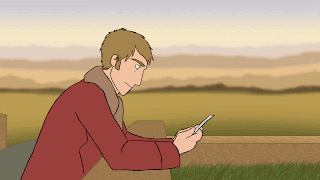
After a think about the film, I decided that the hair wind blowing wasn't going to be an issue because I asked a few people and they said that a in misty conditions, wind wasn't present, so instead I gave AJ a scorning look towards the photograph in his hands.

Shot 2

Shot 2 coloured using the colours from the insert picture.

Shot 3 (rough).
Thursday, 29 November 2012
Film Shots
- Title and Pan up to bridge
- AJ looking at Photo
- Ripping up photo p1
- Ripping up photo p2
- Tossing paper into river
- Looking down at hand
- Taking off ring
- Looking at ring and throwing into river
- Ring falling into river
- Man walking away p1
- Man walking away p2 and ring coming back up
- Man turning round
- Ring on the bridge
- Man suspicious and walk over to ring
- Picks up ring
- Looks at it and then at river
- Ring falling over side of bridge again and man looking over
- Man reflection in river and RM jumping out of river
- RM landing on bridge and man stumbling back p1
- Man stumbling back p2
- RM head cocking
- Man walking over to RM p1
- Man walking over to RM p2
- RM falling back into river
- Man running over to bridge p1
- Man running over to bridge p2
- View of river from bridge
- Man running from bridge p1
- Man running from bridge p2
- Man running along river
- Man stops at river wall
- Man looking frantically for RM
- RM appears near man
- Closer shot and RM walking towards man p1
- Close up of man
- RM walking towards man p2
- Man and RM (from behind RM)
- RM shows ring
- Ring in RM hand
- Shocked man goes to take ring
- Shot of their hands together
- Far away shot of both characters
- Man snatches hand back, scratches head
- RM smiles and rummages through sleeve
- Confused man
- RM pulls out photo, lifts p1
- Lifts photo p2
- Man shocked goes to take photo p1
- Man takes photo p2
- Touches photo
- Smiles at RM
- RM smiles back and walks away
- Man looks on at RM
- RM walking away far off shot
- Man smiles then takes notice of left hand
- Raises left hand and opens it (ring on finger)
- Shocked at first then smiles again and turns to walk back to bridge
- Walking back close view
- Walking over bridge
Test Animations
A test animation of the second shot:

Done in Flash to see how the animation would pan out. I wanted to try animating hair blowing in the wind.
Colour Quicktime Test. (The colours look brighter than they should be because of the upload).
The film will however be done in flash as PS takes far too long and is rather fiddly to colour.
The film will however be done in flash as PS takes far too long and is rather fiddly to colour.
Monday, 26 November 2012


Thursday, 22 November 2012


Wednesday, 21 November 2012
Animatic 3
Slightly changed version, added some more motions to the story, but the timing still seems quick, so I'll adjust that and neaten the lines ready for animation.
Final Concepts
Here are the colours for my characters and the surrounding landscape.




River Man in 'river' form.

AJ and RM (human)

General Background colours.

Colours blurred to add more focus to the characters.

Ring design.

Colours and patterns for bridge.

AJ looking at photograph v.1

AJ looking at photograph v.2

AJ and RM in 'river' form.

Refined bridge and landscape design. (Note: These aren't the proper colours as the line drawing of the bridge is a scan and it came out dark, so the shot looks darker and greyer than it should.)

Bridge vector and colours.

Bridge and landscape without lines showing proper colouring.

RM heads and fins.
Subscribe to:
Posts (Atom)